
Adobe Fonts (formerly known as Typekit) is a great service but isn’t all that useful when you are in the typeface discovery, selection and pairing phase of a design project. If you are like me, then you find it difficult to choose typefaces based on examples of The quick brown fox jumps over the lazy dog or even worse, just the letters Ag.
Seeing real type on actual websites in the wild is much more useful—that is why you are visiting Typewolf, right?
But do you ever discover a typeface you really like on Typewolf but end up disappointed because it’s not available on Adobe Fonts? Wouldn’t it be awesome if you could filter Typewolf to only show sites using fonts on Adobe Fonts?
Well I created a product that does exactly that. With Typewolf’s Guide to Adobe Fonts you’ll be able to browse Typewolf’s Site of the Day section in “Adobe Fonts mode”—every font you see in all of the designs will be available in your Adobe Fonts account. Quickly browse hundreds of real websites to see what typefaces render well for body copy, which ones pair well together and how they can be used to convey different moods.
You’ll also discover my handpicked selection of favorite Adobe Fonts font combinations with explanations of why the pairings work. I also include a collection of my top 10 favorite fonts on Adobe Fonts that I believe are underused on the web (Brandon Grotesque is nice and all but do you really want your site to look like every other site out there?).
If you are a Adobe Fonts user then you will save hours of time during the typeface selection process and end up with much nicer type on your final project. Here’s what’s included:
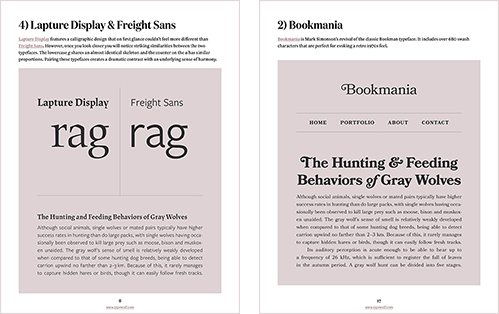
25-page PDF + access to the Sites Using Adobe Fonts section of Typewolf
Get this for free with the Flawless Typography Checklist ($399)

By Jeremiah Shoaf · @typewolf
✩ Buy this! @typewolf ’s guide to @typekit. #typography #design #webdesign
https://t.co/P4qJBdsweO pic.twitter.com/ut55iLjCTV
— Jeffrey Zeldman (@zeldman) December 8, 2015Essential new resource for anyone who cares about beautiful #typography & uses @typekit—Great job @typewolf! https://t.co/QQMDlcMcbz #UI
— Niall O'Kelly (@niallokelly) December 14, 2015Payment is made quickly and securely through ConvertKit Commerce or Gumroad. I do not store or have access to any of your credit card information. There are no accounts to sign up for, and the entire checkout process takes about 30 seconds. The product is delivered instantly after payment, and I offer a 30-day money-back guarantee if you aren’t happy with your purchase for any reason.
In your receipt email, click the View product button and it will take you to a page where you can download the PDF as well as a text file named sites_using_adobe_fonts.txt. That text file contains the login URL and password. Additional information is included inside the PDF on page 4.
Yes. In October of 2018, Typekit officially changed their name to Adobe Fonts. They also made numerous improvements to their service—no more desktop sync limits, no more web-only fonts and no more pageview limits. The entire Adobe Fonts library is included with all Adobe Creative Cloud plans.
No. It’s created specifically for Adobe Fonts users so you probably wouldn’t get much value from it. Although if you wanted to buy it just to help support Typewolf that is always appreciated!
